The Protected Area Competence Assessment Tool (PA_CAT)
Group competence assessment for protected area practitioners – brief description
Content
- A tool developed to help assess Protected Areas Practitioners competences
- If you are a Participant
- Key concepts and terms that you need to know to properly use the tool
Competences
Staff levels
Function levels - Competence categories used in the tool
- The competences used for the online Protected Areas Competence Assessment Tool (PA_CAT)
1. A tool developed to help assess Protected Areas Practitioners
The PA_CAT is a tool developed for assessing competences for a group of Protected Areas Practitioners. The assessment groups can include individuals from individual PA, or several PA and provides an overview of competence levels for the entire group.
This Competence Assessment Tool or Training Needs Assessment (TNA) tool is based on a conceptual framework, which is agreed internationally, and described IUCN's WCPA Global Register of Competences for Protected Area Practitioners1, (Appleton, 2016), called hereafter the PA Competence Register. The tool uses the 300 competences as presented in the PA Competence Register.You are on this platform because:
- A. You want to set up an assessment group and invite people to perform self-assessments. In this case you are an Assessor. Please go to User Guide for Assessors.
- B. You were invited via email to perform a self-assessment, hence you are a Participant in an Assessment Group. Please read section ”2. If you are a Participant”.
2. If you are a Participant
You were invited by an Assessor to perform a self-assessment. Your self-assessment is part of a group assessment. The Assessor can only view the group results, he/she has no access to your personal results. If you are asked to share your personal assessment results with the Assessor, you are the one who decides if you want to share or not. If you decide to share, you can copy graphs and tables from your analysis and share.
Based on the self-assessments performed in your group, the Assessor will conduct analysis and establish competence development needs for the group.
What information you can access on this platform as a Participant?
- you can see the results of your group by going to the Analysis and filter by the name of your group.
- you can see the results of your self-assessment by going to My Assessment -> Completed Self Assessments. Here you will have a personal perspective on the competences you need to improve, and recommendation on specific competences you might want to improve.
It is strongly recommended for you to read also Section ”3. Key concepts and terms that you need to know to properly use the tool”. You will perform the self-assessment either in a guided process or on your own:
- If you are invited to an online or face-to-face meeting by an Assessor, all you have to do is to wait for the meeting. All participants will perform the self-assessments during the meeting.
- If you are instructed by the Assessor to perform the self-assessment on your own, please continue to read the instructions presented below (”Steps for completing your self-assessment without guidance from an Assessor”).
Steps for completing your self-assessment without guidance from an Assessor:
- In the invitation e-mail click register an account or accept invite if you already have an account.
- After registering the new account go back to the invite e-mail and accept invite.
- Go to My Assessment to start the self-assessment and click Start to begin the assessment.
- Read the information on the first page of your assessment. Please read carefully the COMPETENCE ASSESSMENTS SCALE! You are going to use this scale for the self-assessment, it is important for you to understand it well.
- Enter the required data in the form and give your permission for the results of your assessment to be used, without using your personal data, for training needs assessments and related studies and to help design and plan capacity building materials and events.
- If you completed a self-assessment recently (in the last year) you have the possibility to duplicate your answer and allocate it to the new group where you were invited. After entering your personal data you have the possibility to allocate your previous self-assessment- not older than 12 months! - to the new group, you don’t have to complete it again.
- Click on Save and go to the next page to start the assessment.
- You will see the first page of competences from the list of competences potentially relevant to your job. There are explanatory notes and/or examples described at each of the competences to help you better understand them. Please carefully read each competence and the associated explanatory notes!
- Assess your level of competence for each competence using the options given (this list is based on the Competence Assessment Scale provided on the first page of your assessment).
- Once you completed the page, click ‘Save and go to the next page’ at the bottom and move to the next page. You will be reminded if you missed any assessments.
- Your assessment progress will be saved automatically after each step, hence, if you do not finish the self-assessment in one go, you can come back any time later to complete the assessment. Please make sure to complete it before deadline indicated in the invitation email. When you return to your assessment click continue.
- You will be able to edit & revise your choices at any point before submitting the self-assessment. However, once submitted, you will not be able to return to your answers.
- When you completed your self-assessment Submit it.
- You can see your own results at My Assessment -> Completed Self Assessments.
3. Key concepts and terms that you need to know to properly use the tool
In the PA_CAT we refer to a conceptual framework, which is agreed internationally, and described in the Global Register of Competences for Protected Area Practitioners.
Competence Assessment (CA) or Training Needs Assessment (TNA) – an assessment of ‘competence needs’ or ‘competencies’ (see below) related to a job or tasks. The results of the assessment should indicate which of the competences you need for your work should be improved through various learning modes.
Competences
This tool is developed using a competence-based approach. This means that it helps you assess the knowledge and skills that are needed to fulfil your present and/or future tasks and, as far as possible, some of the aspects that are related to your attitude to the work you are carrying out. Therefore, it is helping you to self-asses the competencies you need.
A competence2 derives from the combination of knowledge, skills and attitude (ASK). A competent individual can clearly demonstrate that he/she has knowledge on the theoretical and technical aspects of a specific task, is able to perform that task reliably and consistently and complete it having a proper attitude.
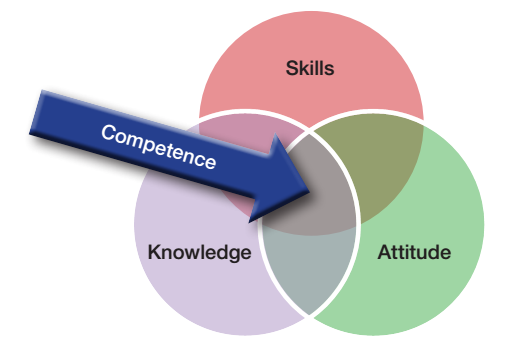
- Skills refer to the ability to perform tasks and solve problems.
- Knowledge is about the outcome of the assimilation of information through learning. Knowledge is the body of facts, principles, theories and practices that is related to a field of study or work.
- Attitude is about a stable, long-lasting, learnt predisposition to respond to certain things in a certain way. Attitudes are formed on the basis of beliefs, feelings and intentions. Having the right attitude helps ensure that an individual completes the task positively, professionally, ethically and conscientiously.
The competence-based approach in building the capacity of protected areas practitioners refers to providing learning opportunities through diverse learning modes3 that enable them to develop or acquire the skills, knowledge and attitude needed to effectively perform tasks for the effective management of protected areas.
Staff levels
The competence needs for a person working in a PA are closely related to the level of responsibilities in the workplace. Therefore, before you start, you should understand what is the classification used for staff (personnel) levels in this competence based approach of the competence assessment tool.
Staff levels - refer to categories / groups of staff that have similar tasks, therefore should have similar combinations of competencies. The following table is adapted from the Global Register of Competences for Protected Area Practitioners and help identify levels of individual responsibility. The numbers used for each level (0-4) do not indicate a hierarchy but a different level of responsibility (or complexity) corresponding to a job position. This should be usually correlated with the level of training and experience required to do that job successfully. Each of these levels can be found under different job titles/names at national, regional and local level, in all sectors (private, state, civil society). The exact ‘job title’ can vary considerably in each country, the table contains some examples.
Staff levels / Individual levels of responsibility |
||
| Level | Typical title | Scope of work and responsibility |
| LEVEL 4 | EXECUTIVE | Central direction and management of large organizations. National and regional policy development, spatial and strategic planning. Cross sectoral coordination. Direction of complex programmes and plans. Examples of positions: director or senior executive of national / regional Agencies or ministerial departments for PAs or resource management, Director of national/regional NGO, landowners. |
| LEVEL 3 | SENIOR MANAGER | Direction and management of medium-sized organizations. Planning and management of projects and programmes within strategic frameworks. Conducting and leading complex and technical programmes (according to speciality) Examples of positions: PA director, local government / Agency official in charge with PAs , senior PA management team member, landowners. |
| LEVEL 2 | MIDDLE MANAGER, TECHNICAL SPECIALIST |
Management, organization and leadership of technical sections and teams implementing plans and projects. Completing specific and complex technical assignments (according to technical specialty) Examples of positions: head ranger, PA biologist, education/outreach/ tourism officer, landowners. |
| LEVEL 1 | SKILLED WORKER | Completing specific and sometimes complex tasks and assignments under regular supervision (this can include field and administrative staff). Examples of positions: PA/tourism/community ranger, resource warden (forestry, fisheries, etc), administrative staff, technician, skilled volunteer |
| (LEVEL 0) Not used |
UNSKILLED LABOURER | Completing practical tasks under continuous supervision (this often refers to also support staff). Examples of positions: labourer, unskilled volunteer, casual worker |
4. Competence categories used in the tool
The table below presents the competence categories as developed through the PA Competence Register (Appleton M.R., 2016). Each Category has a three letter code, a title and a brief description. These codes are used for presenting the results of your self-assessment.
Each competence category covers several specific skills and knowledge requirements, indicating what a PA professional should know and be able to do. This list is used in your self-assessment process.
Competence categories used in the online TNA
Category Code |
Category Title |
Category Description |
PPP |
Protected area policy, planning and projects |
Providing a strategic and rationally planned framework for PA governance and management. |
ORG |
Organisational leadership and development |
Establishing and sustaining well governed, managed and led organizations for PA management. |
HRM |
Human resource management |
Establishing an adequate, competent, well managed and supported work force for PAs. |
FRM |
Financial and operational resource management |
Ensuring that the PAs are adequately financed and resourced and that resources are effectively and efficiently deployed and used. |
ADR |
Administrative documentation and reporting |
Establishing and implementing procedures for information management, documentation and reporting |
CAC |
Communication and collaboration |
Building and using the skills required to communicate and collaborate effectively |
BIO |
Biodiversity conservation |
Ensuring the maintenance of the ecological values of the PA through management and monitoring of species, their habitats, ecosystems and natural resource use. |
LAR |
Upholding laws and regulations |
Ensuring that laws, regulations, and rights affecting the PA are upheld. |
COM |
Local communities and cultures |
Establishing systems of PA governance and management that address the needs and rights of local communities. |
TRP |
Tourism, recreation and public use |
Providing environmentally and economically sustainable tourism and recreation in and around PAs. |
AWA |
Awareness and education |
Ensuring that local stakeholders, visitors, decision makers and the wider public are aware of protected areas their purpose and values and how they are governed and managed. |
FLD |
Field/water craft and site Maintenance |
Conducting field work and site maintenance tasks correctly, safely and securely. |
TEC |
Technology |
Using of technology to support protected area management |
FPC |
Foundation personal competences |
Demonstrate fundamental personal skills and behaviours required for day-to-day PA work. |
APC |
Advanced Personal Competences |
Demonstrate personal skills and behaviours required for effective performance and leadership. |
5. The competences used for the online PA Competence Assessment Tool (PA_CAT)
For each competences in you will find on the platform:
- - the Competence Statement, as in column B of the table below,
- - the associated competence code (see column A), formed by the Category code and the number of the competence in its category,
- - a brief explanation of the competence (as in column C below).
Code |
Competence. The individual should be able to: |
Details, scope and variations. |
A |
B |
C |
BIO 2.4 |
Propose justified management measures for conservation of species. |
|
1 Appleton, M.R. (2016). A Global Register of Competences for Protected Area Practitioners. Gland, Switzerland: IUCN
2 Competence/Competency. The ability, encompassing knowledge, skills and attitudes, of an individual to perform adequately in a job (International Labour Organization).
3 List of learning modes provided in the Global Register